Press and hold to stall the upstream
v0.1 · macOS / Windows / Linux · free and open source
Find out why your LLM stream feels slow.
A local proxy that sits between your code and the model API. It forwards every byte untouched and shows you what's inside: time to first token, tokens per second, the exact moment a stream stalled, and tool-call JSON as it's being written.
01 Setup
One line changes. Nothing else does.
There's no SDK to install and no code to instrument. Point the base URL at the proxy and run your program as usual. Your API key goes straight through to the provider; the app masks it and never writes it to disk.
- OPENAI_BASE_URL=https://api.openai.com/v1
+ OPENAI_BASE_URL=http://127.0.0.1:8787/openai/v1
Every official OpenAI SDK reads this variable. Works for any OpenAI-compatible server too.
02 The app
This is the actual window, not a mockup.
Four requests captured on Linux: OpenAI-format and Anthropic streams, one rate-limited call, and a Claude response with thinking and a tool call.
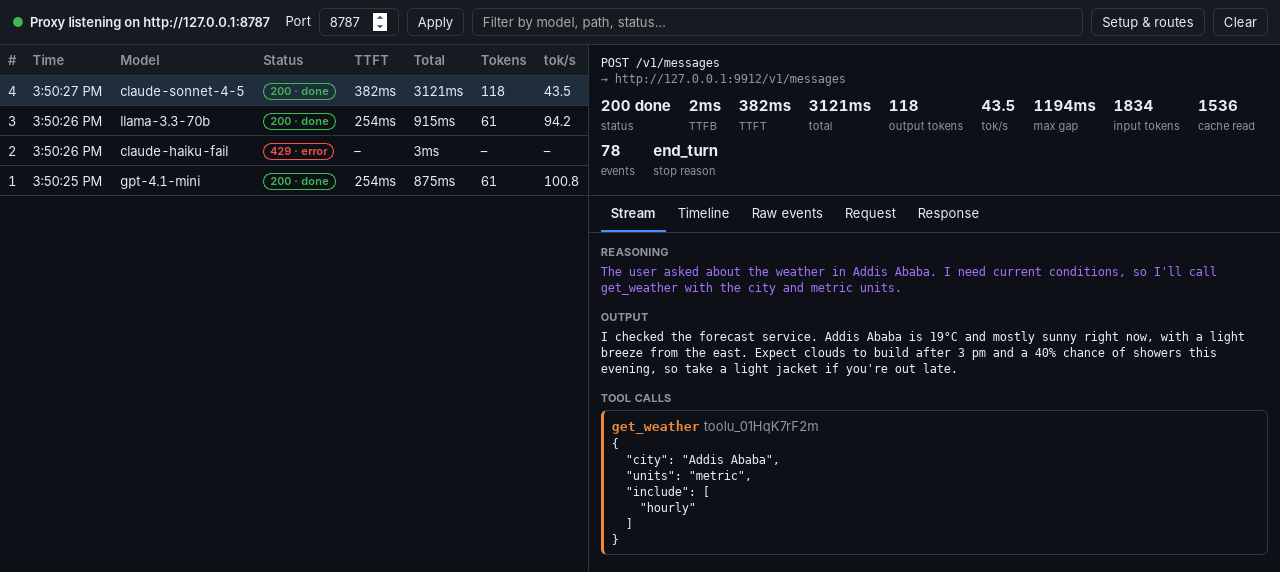
- 1TTFT 382 ms
Measured at the proxy, from request in to first generated token out.
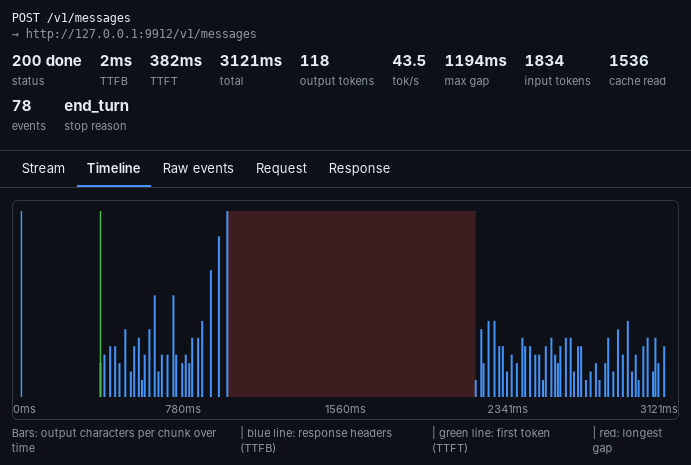
- 2Max gap 1,194 ms
After the tool call, the model went quiet for over a second. The timeline below shows where.
- 3get_weather, assembled
Arguments stitched together from four input_json_delta fragments as they streamed.
- 4429, recorded
Failed calls stay in the list with the provider's error message.
03 Formats
It reads the stream, not the URL.
Each payload is recognised by its shape, so OpenRouter, Groq, vLLM, LM Studio, llama.cpp and your own gateway all decode without configuration. Fifteen providers have ready-made routes.
| Format | Transport | Reasoning | Tool calls | Usage |
|---|---|---|---|---|
| OpenAI Chat Completions | SSE | reasoning_content | tool_calls deltas | incl. cached |
| OpenAI Responses | SSE | reasoning summaries | function, custom, MCP | incl. reasoning |
| Anthropic Messages | SSE | thinking blocks | input_json_delta | incl. cache read/write |
| Google Gemini | SSE or JSON array | thought parts | functionCall | incl. thoughts |
| Ollama | NDJSON | thinking | tool_calls | eval counts |
04 Download
Download
Native builds for every desktop, made with Rust and Tauri.
Prefer to build it yourself? git clone https://github.com/Kidyoh/llm-stream-debugger then cargo run -p llm-stream-debugger.
05 Questions
Before you install it.
Does it slow down my requests?
No measurable amount. The proxy runs on localhost in Rust and forwards each chunk the moment it arrives, without buffering. Decoding happens on a copy, off the hot path.
Which providers and SDKs work?
Anything you can point at a base URL. Built-in routes cover OpenAI, Anthropic, Google Gemini, OpenRouter, Groq, Mistral, DeepSeek, xAI, Together, Fireworks, Cerebras, Perplexity, Cohere, Ollama and LM Studio. You can add your own routes, or send an x-upstream-base header for one-off endpoints. Streams in OpenAI Chat and Responses, Anthropic Messages, Gemini and Ollama formats are fully decoded.
Is my API key safe?
Your key goes from your app to the provider, exactly as it would without the proxy. The debugger never stores it: secret headers and ?key= parameters are masked in the UI, history lives in memory only, and the app makes no network calls of its own.
macOS says the app "is damaged" or "can't be opened"
Early builds aren't notarized yet. Move the app to Applications, then run xattr -cr "/Applications/LLM Stream Debugger.app" once, or right-click the app and choose Open.
Windows shows a SmartScreen warning
The installer isn't code-signed yet. Click More info → Run anyway. You can always build it yourself from source.
How do I run the AppImage on Linux?
Make it executable and run it: chmod +x LLM*.AppImage && ./LLM*.AppImage. On Debian or Ubuntu you can install the .deb instead with sudo apt install ./llm-stream-debugger_*.deb.
Can it capture apps I can't reconfigure?
Not yet. Today it works with clients whose base URL you can set (nearly every SDK and CLI, including Claude Code via ANTHROPIC_BASE_URL). Transparent HTTPS interception is on the roadmap.